IT/[개발]코인자동매매
1. vscode(visual studio code)로 python 시작하기
haemni
2022. 2. 19. 13:55
728x90
반응형
SMALL
1. 우선 visual studio code 를 설치합니다
설치경로 : https://code.visualstudio.com/
각자 os에 맞는 파일로 다운받으세요
Visual Studio Code - Code Editing. Redefined
Visual Studio Code is a code editor redefined and optimized for building and debugging modern web and cloud applications. Visual Studio Code is free and available on your favorite platform - Linux, macOS, and Windows.
code.visualstudio.com
2. visual studio code를 설치하셨으면 가장 좌측 메뉴의 네모 네개 있는 아이콘을 선택하시고 python 을 입력하세요. Microsoft 파란 딱지가 붙어있는걸로 설치하세요~
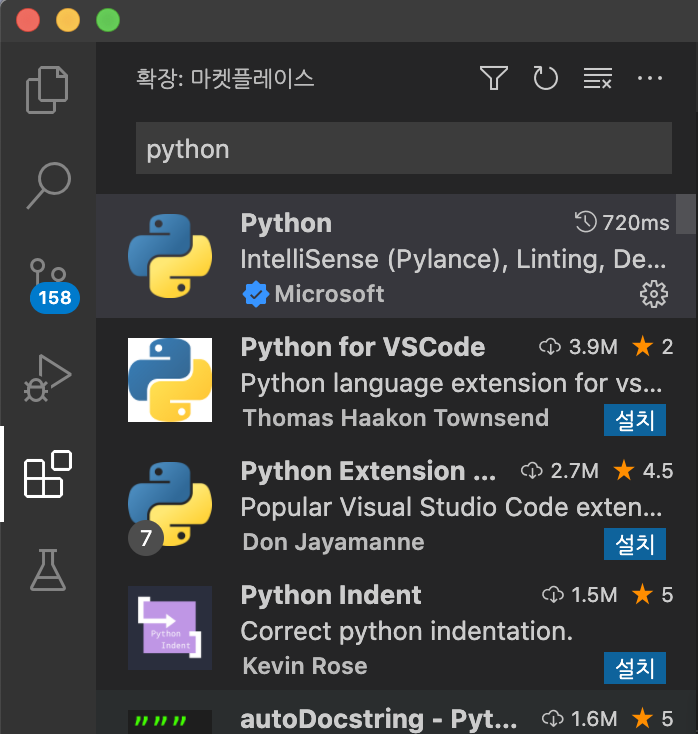
3. 하단에 설치 후 , 새 파일을 하나 만드시고, 메뉴바의 파일> 새파일을 이용해 파일을 하나 생성하시고,
가장 아래의 언어모드를 python 으로 바꿔주시면 됩니다.

4. 잘 설치가 되었는지 확인하시려면 print("Hello world!!") 를 입력하시고, f5, 혹은 run 해주세요~
반응형
LIST